



DSL guide to more secure smartphones
In December 2025, the Digital Security Lab (DSL) of Reporters Without Borders (RSF) identified a piece of spyware reportedly deployed by the Belarusian State Security Committee (KGB RB) which is built for Android smartphones. Unlike widely covered tools such as Pegasus, ResidentBat does not rely on exploiting software vulnerabilities. Instead, it is installed after security forces obtain physical access to a device and its unlock PIN. In this blog post, DSL outlines how users can recognise spyware like ResidentBat and reduce their exposure.
How to protect yourself against ResidentBat and similar spyware
Physical access is the critical requirement
Spyware like ResidentBat requires hands-on access to a device. The most important defence is therefore to prevent the confiscation of smartphones that hold sensitive data.
- Consider carrying a secondary device in higher-risk situations (e.g. border crossings, reporting at demonstrations or in crisis areas, and police interviews).
- Where feasible, leave your primary smartphone in a secure location rather than taking it into high-risk environments.
Use up-to-date devices and install updates regularly
DSL recommends using smartphones that run current versions of Android or iOS and receive regular security updates. Recent Android releases have significantly strengthened the security architecture. Using an outdated device exposes you to known vulnerabilities and forgoes new protection mechanisms.
Android: enable Advanced Protection Mode
Users who consider themselves at high risk of targeted spyware attacks should enable the Advanced Protection Mode available from Android 16 onwards. Among other protections, this setting blocks installation from unknown sources (sideloading) and prevents disabling Google Play Protect, which can detect harmful apps.
Path: Settings > Security & privacy > Advanced protection > Device protection
Prefer devices that do not allow sideloading
Where possible, use a device whose software does not permit installing apps from unofficial sources (outside the official app store). iPhones, for example, restrict sideloading by design. iOS also grants apps fewer deep system privileges (for instance, limiting abuse of accessibility services), which ResidentBat reportedly relies on.
Prepare devices for possible confiscation
Because attacks like ResidentBat depend on physical access, take the following precautions in elevated-risk contexts such as interviews by security services:
- Never enter your PIN where it can be observed, including in view of cameras.
- Use an alphanumeric passcode (letters and numbers). These are far harder to guess or shoulder-surf than numeric PINs or pattern unlocks.
- Consider security-hardened operating systems such as GrapheneOS, which offer additional safeguards, for example:
- PIN scrambling: the keypad layout changes on each entry, hindering PIN observation.
- Two-factor unlocking: both a fingerprint and PIN are required to unlock.
- Duress mode: an alternate passcode triggers secure data wipe on unlock attempt.
GrapheneOS provides strong protections but is not accessible to everyone because it can currently be installed only on Google Pixel devices. If switching is not practical, keep your device updated and watch for signs of compromise.
Checking whether you may be affected
Use trusted forensic tooling (MVT)
Alongside the ResidentBat analysis, DSL and partners developed additional forensic tooling (see report for technical details). With MVT (Mobile Verification Toolkit), all ResidentBat variants identified by DSL can be detected — including versions with varying package names. If MVT indicates that an app associated with the spyware has been active on your device, please contact RESIDENT.NGO, DSL at RSF, or Amnesty International’s Security Lab. These teams coordinate closely to determine where the spyware has been deployed and who has been targeted.
Important: Because the spyware can remotely erase device data, switch Airplane mode on first. Only then run MVT or have the device examined by digital forensics experts.
Noticeable indicators of infection
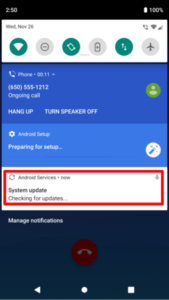
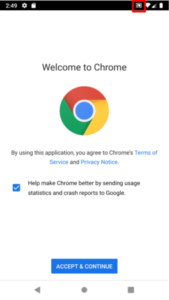
ResidentBat displays a specific “update notification” after it records phone calls. In addition, Android may show a Media Projection icon when the spyware captures screen recordings. If you see a notification from an unknown app, or the Media Projection icon appears when you are not sharing your screen, treat this as a warning sign.
Screenshots below illustrate suspicious indicators:
Device checks on Android
Verify Google Play Protect
Before installation, attackers must disable Google Play Protect on the target device. Anyone at risk of surveillance should therefore keep Play Protect enabled. If the setting is disabled and you did not change it, this is a red flag.
Path: Play Store > profile icon (top-right) > Play Protect
Review device admin apps and accessibility services
Check regularly whether any unknown device admin apps or accessibility services are enabled.
- Device admin: Settings > Security & privacy > Advanced protection > Device admin apps. Disable and uninstall unknown entries.
- Accessibility: Settings > Accessibility > Downloaded apps. Disable and remove unknown services.
- All apps overview: Settings > Apps > See all [N] apps. Note that invasive apps may use names and icons that appear legitimate. When in doubt, consult the forensic teams mentioned above.
The exact paths may vary slightly by Android version and device manufacturer.